Eingabehilfen öffnen

Ordering process

Your fully configured web hosting package in just a few steps!

To make the ordering process as simple as possible for you, we have provided an overview of the order flow here.

Information

Existing customers can also order new services directly by e-mail to Diese E-Mail-Adresse ist vor Spambots geschützt! Zur Anzeige muss JavaScript eingeschaltet sein!

You can find this article in other languages too:

The start: Choose a hosting package

You can take your time selecting the product you want on our website (for example, one of our SSD web hosting plans starting at EUR 2.99 per month) and click the Bestellen button on the desired product. You will immediately be taken to our ordering system, which guides you through the order step by step.
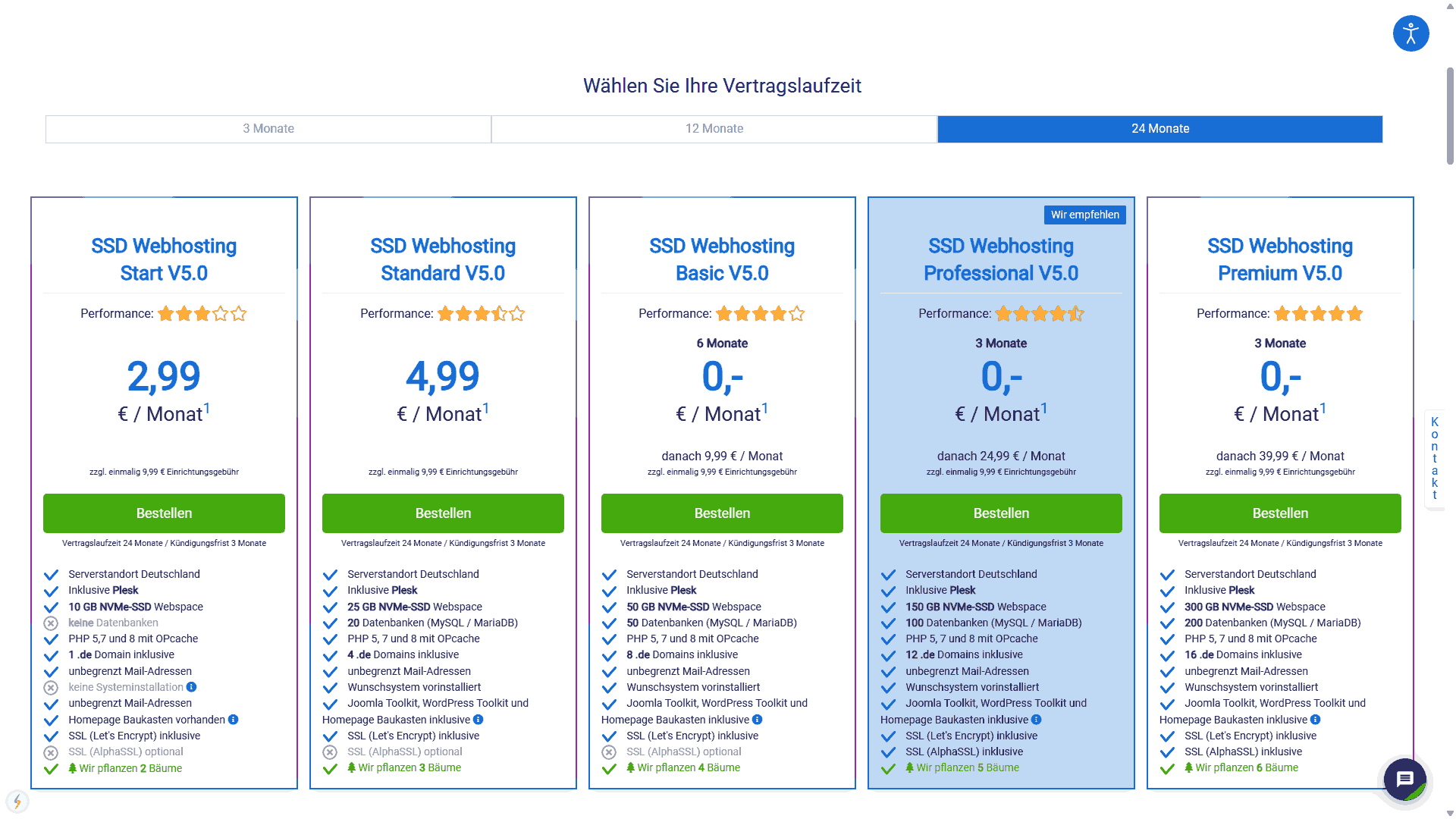
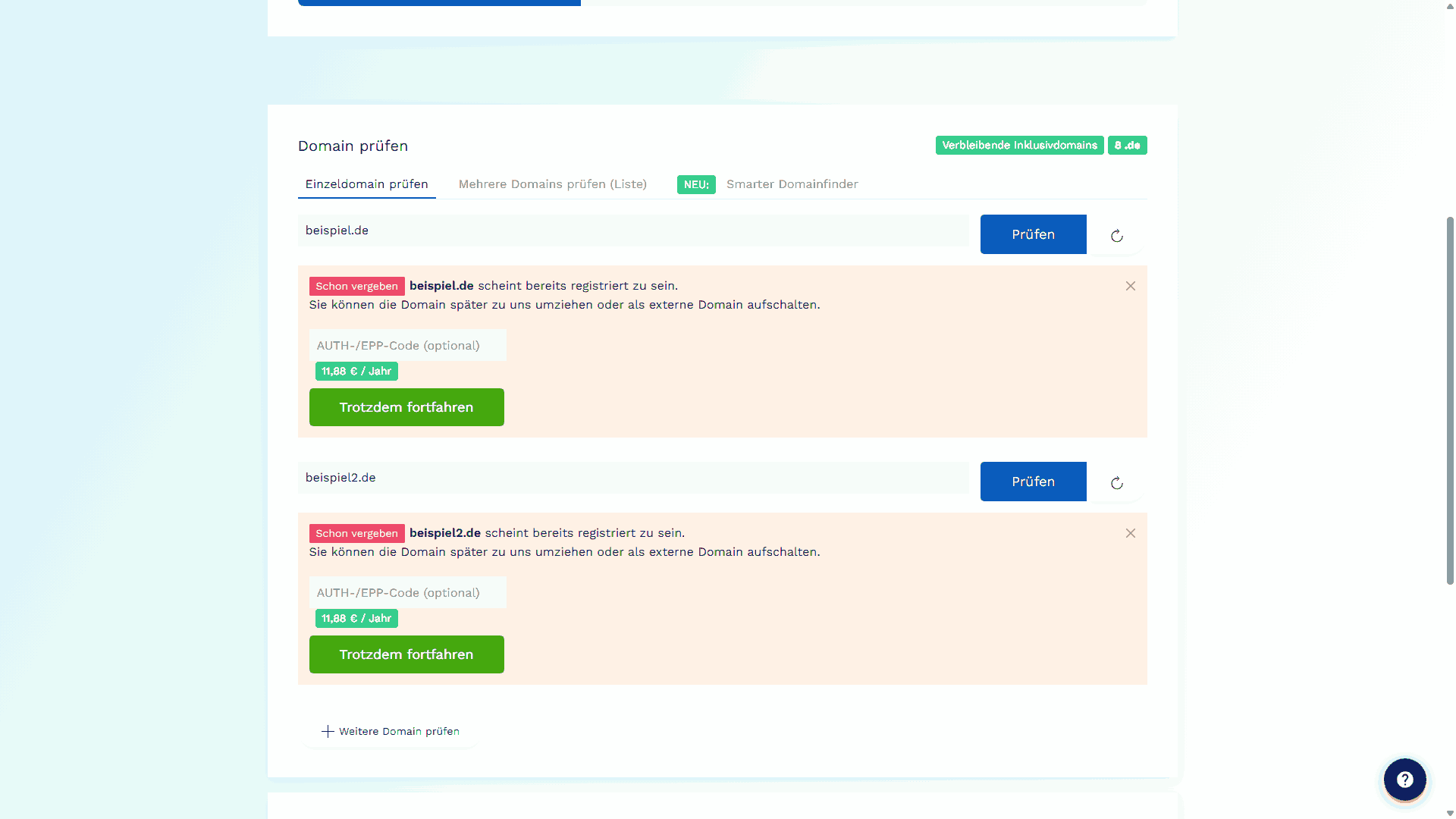
Figure 1 - Overview of the hosting plans on the website

Step 1: Select desired domain(s)

The first step in the ordering system is the domain check. This lets you add your desired domains to the order. It also checks directly whether the domain is still available or already taken. If you already own a domain and want to transfer it to us, you can also provide the AUTH code right away so that we can take over the domain directly.

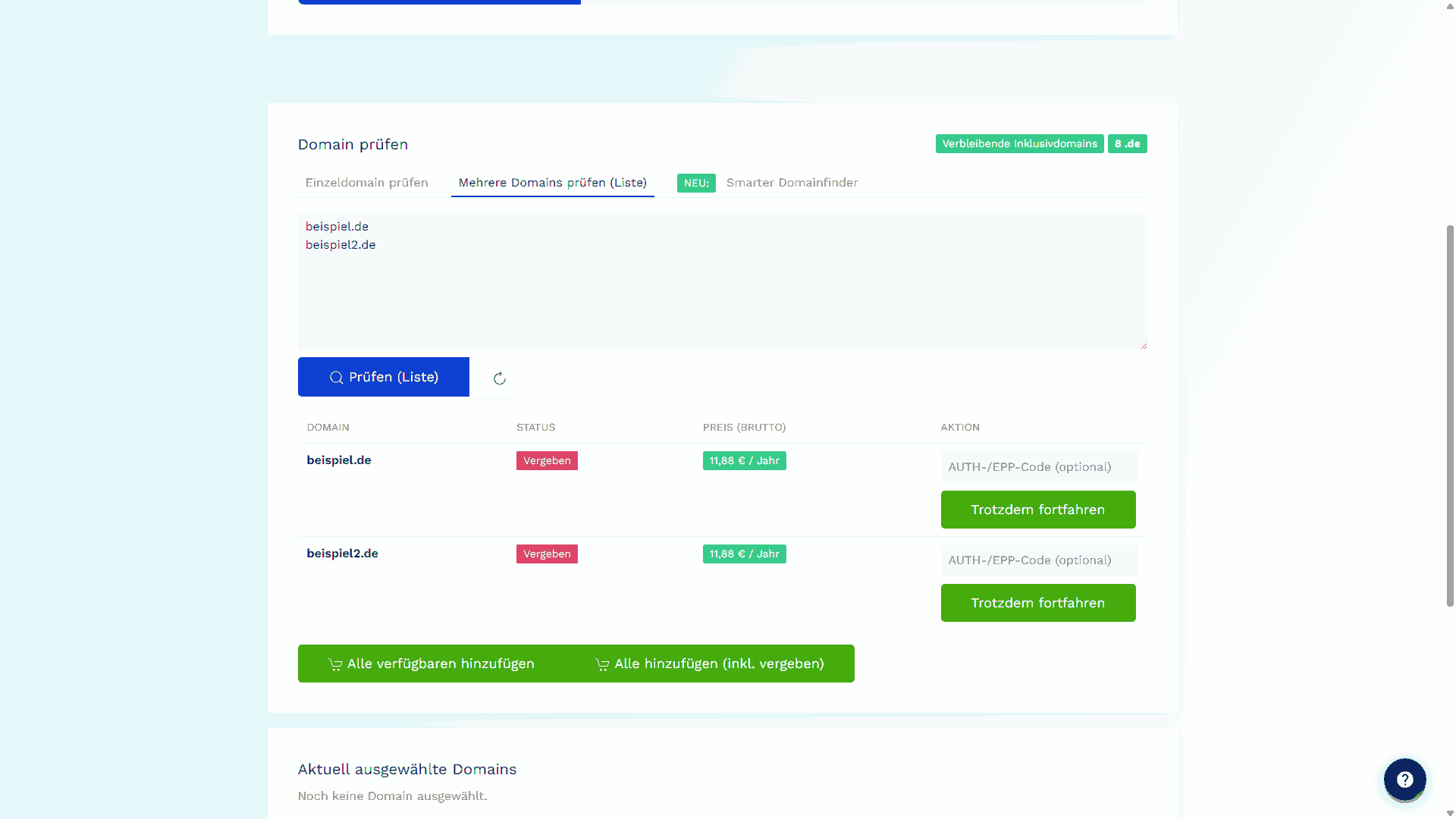
To add a domain to the contract, its status must first be checked. This can be done individually or as a list. Simply enter the desired domains and click Prüfen.

The domain can have one of three statuses

  • Verfügbar

    The domain is free and can be registered at the stated price.

  • Vergeben

    The domain is already registered, but can be transferred to us.

  • Nicht verfügbar

    The domain cannot be purchased through DM Solutions.

Figure 2 - Checking individual domains in the domain check
Figure 3 - Parallel checking of multiple domains in the domain check

You can switch between checking a single domain (Einzeldomain prüfen) and checking multiple domains as a list (Mehrere Domains prüfen (Liste)) at any time and later remove domains you no longer want from the order one by one.

Smart Domain Finder

Still not sure which domain you want to use?

Simply use the Smart Domain Finder. Enter your preferred term as the base name, add keywords, select the industry and the number of results. Possible domain variants will then be displayed below and can be added directly to the contract.
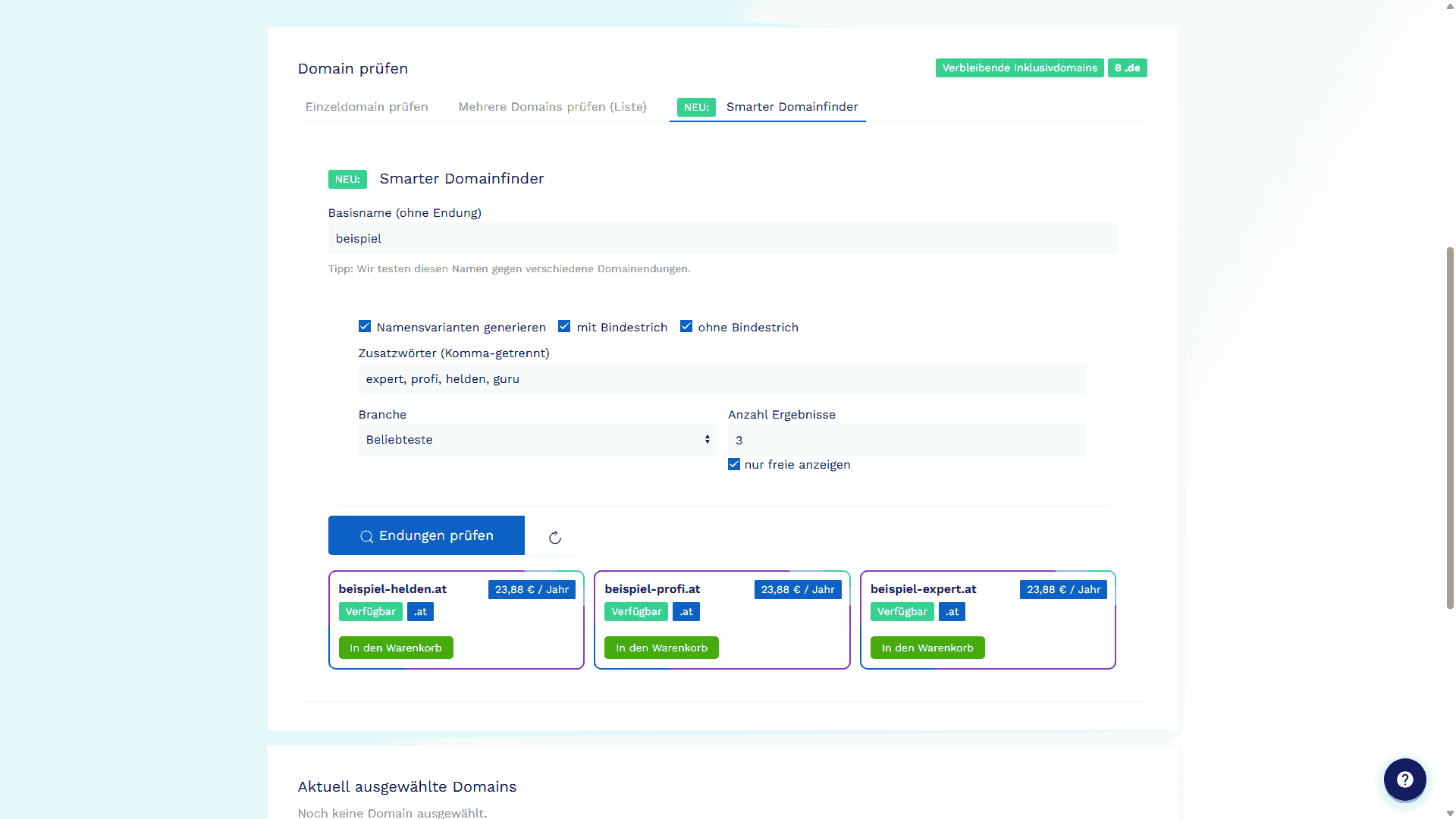
Figure 4 - New combinations of domain name and domain extension can be found more easily with the Smart Domain Finder.

Once you have added all desired domains, simply click the Domain übernehmen und weiter button at the bottom. If you do not need a domain in the package, simply click the Ohne Domain weiter button.

Step 2: Preferred system or migration service

In the next step, you can specify whether we may prepare web software for you on your hosting package. As part of setup, you can choose between a system installation and the migration of an existing website.
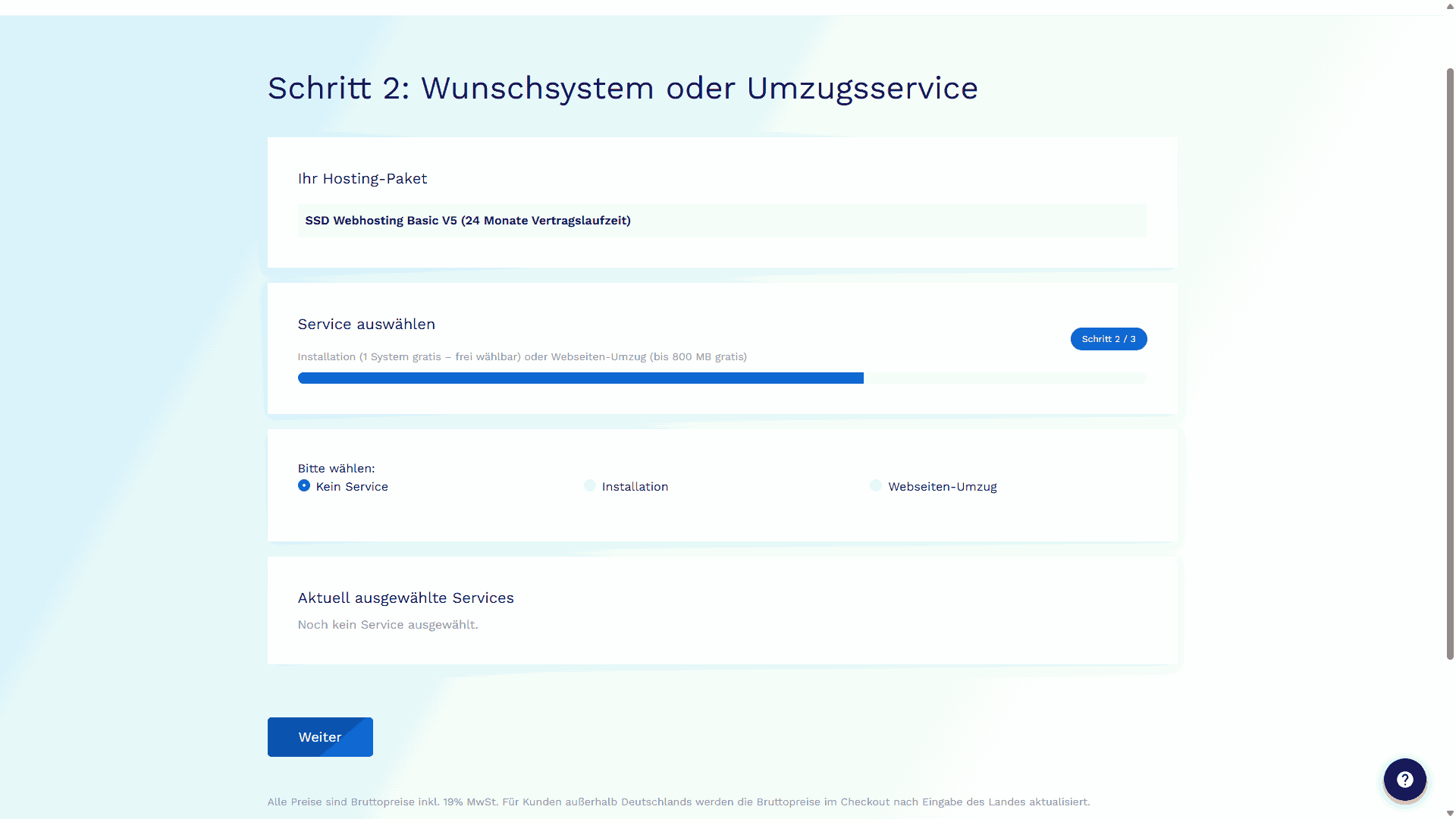
Figure 5 - You can choose between "No service", "Installation", and "Website migration"

Installation

Select the systems that we may preinstall for you. One system installation is available free of charge when the contract is concluded; additional installations are available for a fee. Please mark which system may therefore be installed free of charge as part of the setup by marking it as Als kostenloses System markieren.
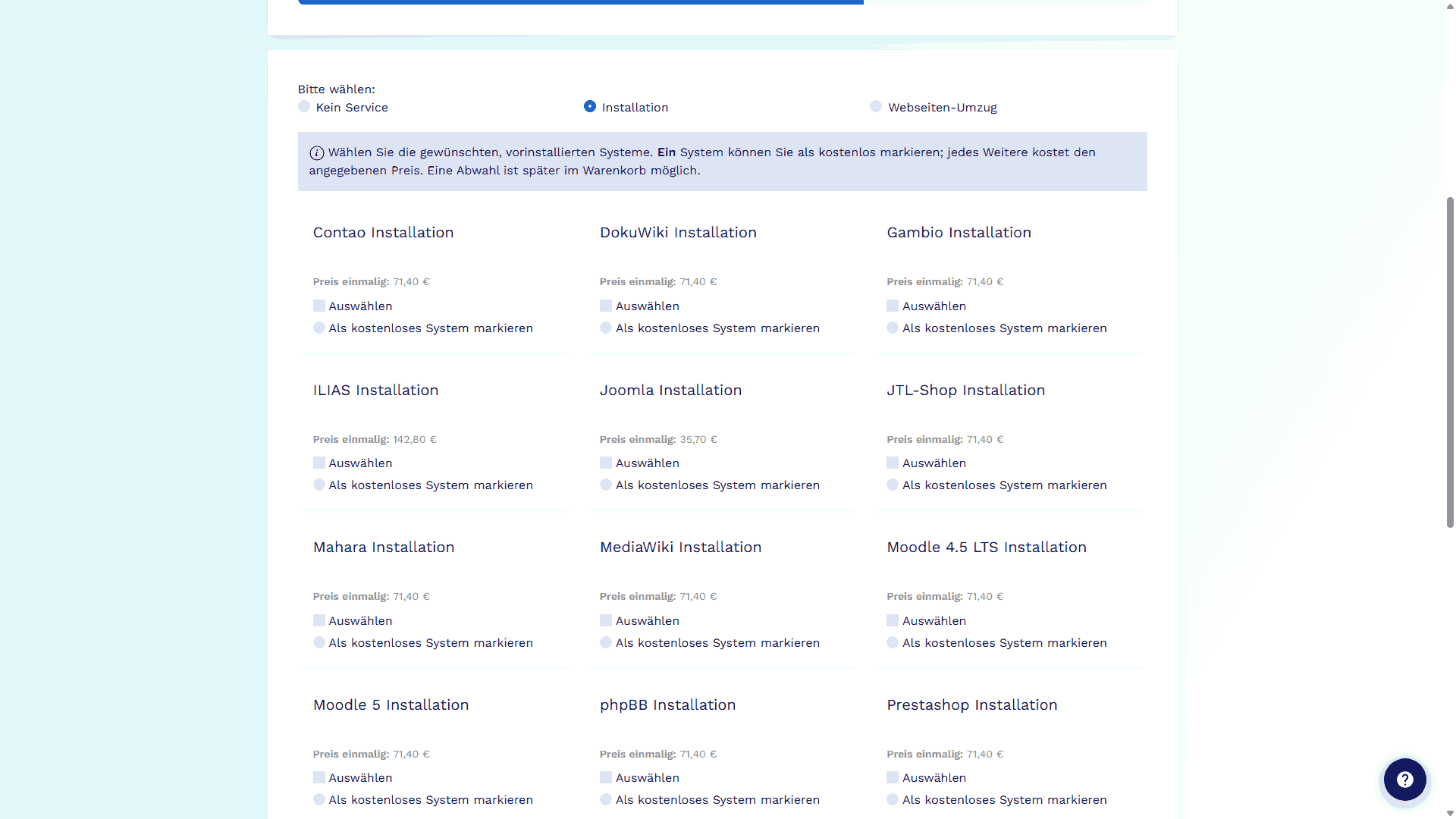
Figure 6 - You can choose between different preferred systems

If you want a system multiple times, you can simply note this in the Bemerkungen field before completing the order.

Webseiten-Umzug

You can have one or more websites migrated to us. One website up to 800 MB in size can be migrated free of charge. Additional costs apply for larger data volumes.

You can already enter the known data volume here. The price for the migration will then be shown below, and you can use Umzug übernehmen to include it directly in the order as an additional service. If you select this, please keep the access data for the previous provider ready and send it to us separately afterwards.
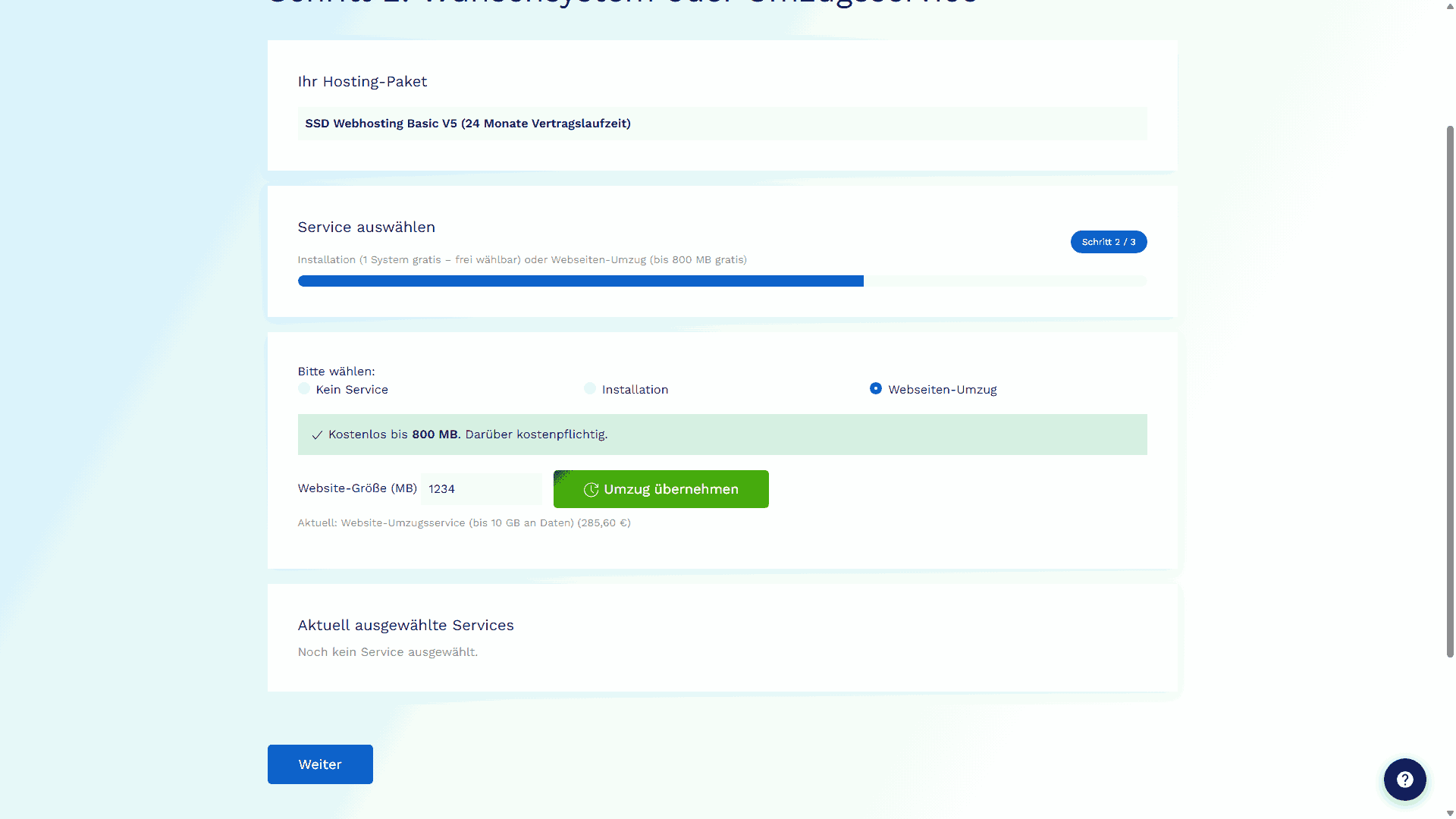
Figure 7 - A data migration can be booked directly

Kein Service

You can also start without a website or handle the website migration yourself. If problems occur later or you still need assistance, we will be happy to help.

Once you have made your choice, click Weiter to go to the next step.

Step 3: Extras

Now you can add various additional services to your order. Simply click the respective Hinzufügen button.
All items are optional and can also be removed again before the order is completed.

Depending on the selected plan, different options and steps may be available. Corresponding notes can be found in the respective sections.

Backups

All plans

Here you can add a longer retention period for the backups created by DM Solutions. A 7-day retention period is always included; you do not need to book this separately.
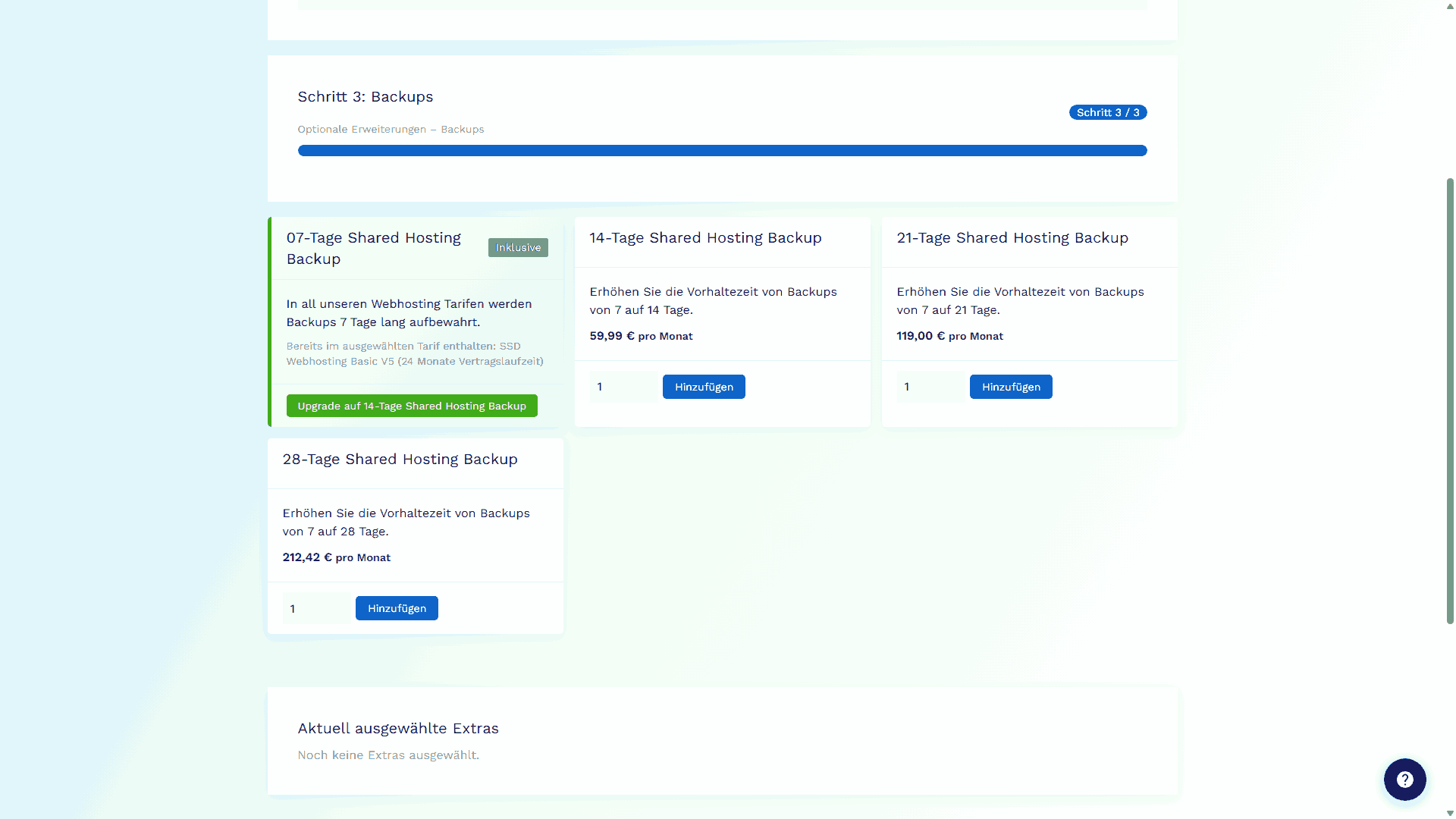
Figure 8 - You can choose between different retention periods

Support

All plans

Would you like to hand over setup support for the website or other hosting-related tasks to us in advance? Then you can book support hours or corresponding support and update service packages directly here.
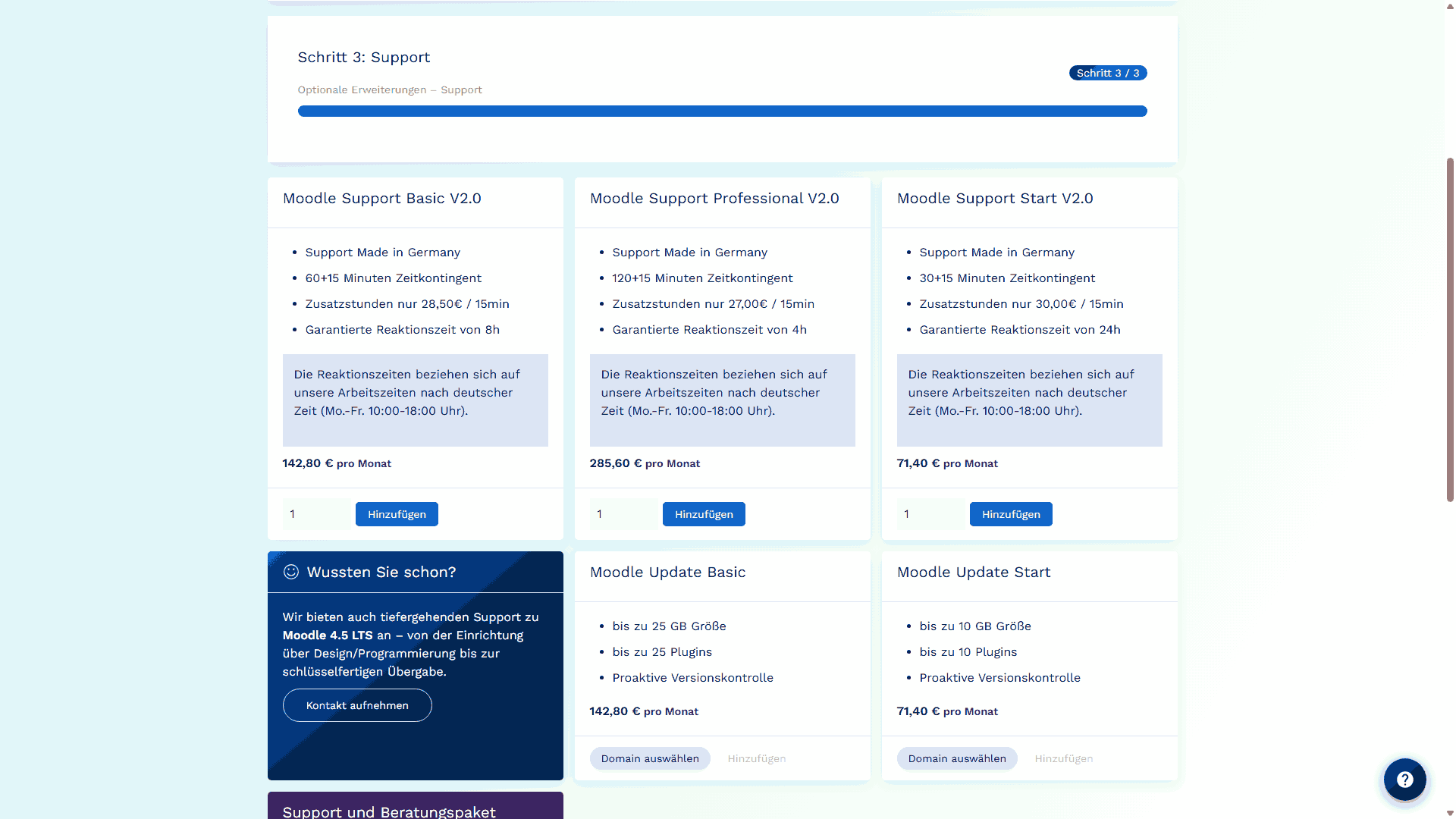
Figure 9 - Depending on the preferred system or plan, various support services can be booked directly

Security

All plans

Security always comes first. You can therefore book additional services for your domains here, such as SSL certificates or the domain trustee service (Domain Treuhandservice), so that you do not appear publicly as the domain owner.
You can also download the trustee agreement directly here so that you can later send it to us together with the order.
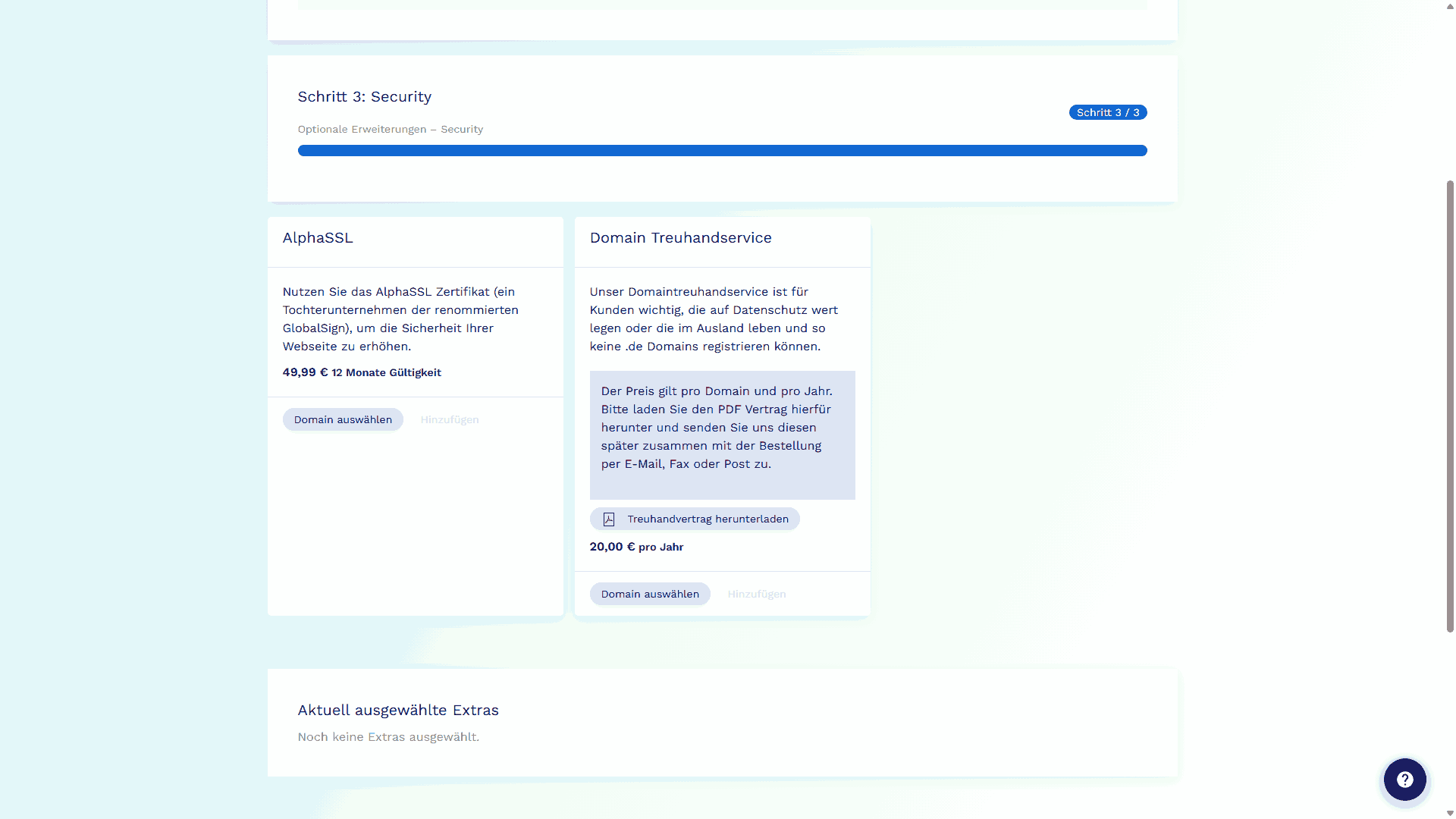
Figure 10 - View of additional services to increase security

Software

server plans only no shared hosting

For our server offers (Managed vServer, Managed server, etc.), additional services can be added or the Plesk license can be extended. These can be booked directly here.

Figure 11 - A server can be customized with additional software

Reseller

reseller and server plans only not for regular hosting

Resellers can resell the services booked with us to their own end customers. In this step of the ordering process, you can add services directly that are intended for this purpose.

Figure 12 - Resellers can have their server set up so that it is not directly visible that it is actually provided by

Once you have selected all desired services, click Weiter zum Warenkorb to go to the order overview.

Step 4: The cart

Figure 13 - The cart with all booked services

In the cart, you can see all services that you have added during the ordering process. Here you can check again whether everything you want is included or remove services that you do not need after all.
If you have also received a coupon code, you can add it in this step of the order.

When the order is complete, click Weiter zur Kasse to checkout to proceed to the next step.

Step 5: Checkout

Figure 14 - In the final step, all required contact details and confirmations are collected

In this step, you enter your personal data for the order, choose the payment interval and payment method, and, if you wish, tell us how you found us. On the right you can also see all items you have selected again and, if necessary, return to the cart to remove unwanted services.
When you want to submit the order, simply click the Zahlungspflichtig bestellen button on the right.

Figure 15 - The order completion button "Place binding order"
Quote instead of order!

Do you not want to order the booked services immediately, or do you need a written quote to submit to your supervisor? With the blue PDF-Angebot erstellen button at the very bottom, you can download all selected services as a quote in advance and save it locally. You can then resume the order at any time by sending us the quote, so you do not have to go through the ordering process again.

Abbildung 16 - Aus der Bestellung kann ein Angebot erzeugt werden, um die Buchung später abzuschließen

Completing the order

The pre-filled forms can now simply be downloaded. You will also receive an order confirmation by e-mail containing the link to the order form. This lets you download the contract later as well.
We need the documents returned to us signed by you. You can sign directly digitally or print out the forms in the traditional way, sign them and scan them again. Then simply send us the contract documents by e-mail, fax or mail.

preferred
by E-MAIL
Diese E-Mail-Adresse ist vor Spambots geschützt! Zur Anzeige muss JavaScript eingeschaltet sein!
alternatively
by FAX
06181 - 502 30 13
or
by MAIL
DM Solutions GmbH
Friedrichstr. 50A
63450 Hanau

We will then set up your web hosting package promptly and send you the access data.

Frequently asked questions about the ordering process

  • Do I absolutely have to add a domain?

    No, you can initially order the hosting without a domain and add your desired domain later.

  • I would like to use system X, but it is not shown. How can I specify system X for the free installation?

    You can simply enter your preferred system in the Bemerkungen field at the end of the ordering process. If you do not want any other system, please select Kein Service in step 2.
    If you additionally want one of the listed systems, simply select it and, if applicable, remove the checkmark from Als kostenloses System markieren if we should preinstall the individual system free of charge.

  • Can I add service X later or do I have to specify it directly during the ordering process?

    You can book additional services at any time. Simply contact our support team.

  • I am from country X, but I cannot select it when ordering. How can I still order hosting from DM Solutions?

    If the country is not available in the selection, please contact our support by e-mail: Diese E-Mail-Adresse ist vor Spambots geschützt! Zur Anzeige muss JavaScript eingeschaltet sein!
    We will be happy to discuss with you how we can provide the desired hosting.

  • I would like to enter my VAT identification number during the order so that invoices are issued net. I cannot find the field! Where can I find it?

    The field is only displayed if

    • you have entered a company name in your order, and
    • an EU country other than "Germany" has been selected.

    If you are acting as a sole proprietor, please use the company name that was stated when applying.
    If you are unsure, simply leave the field empty. A VAT identification number can also be provided later.

  • Why is a date of birth requested?

    The information is used for age verification, because if interested parties are minors, the signature of a parent or legal guardian is required.
    We also recommend using an e-mail address belonging to the person signing the documents.


Der angezeigte Gesamtpreis enthält die gesetzliche deutsche Mehrwertsteuer in Höhe von 19%. Preise und Angebote nur gültig für Kunden mit Wohnsitz in Deutschland.
  • Sie haben Fragen?
    Tel.: 06181 - 502 30 10
    E-Mail: Diese E-Mail-Adresse ist vor Spambots geschützt! Zur Anzeige muss JavaScript eingeschaltet sein!

K

o

n

t

a

k

t